API Documentation
Generate invoices, quotes & receipts from JSON — or convert any HTML/URL to PDF.
01. Authentication
Authenticate your requests using the X-API-Key header. You can generate a key in your dashboard.
Header Example
X-API-Key: pmh_live_xxxxxxxxxxxxxxxx02. Base URL
03. Document Generation
Don't build invoice HTML by hand. Send structured JSON (parties, line items, tax) to a ready-made template and get a polished PDF back. Three document types, each with multiple styles. The server computes all totals — you never send a precomputed total.
{
  "style": "modern",
  "number": "INV-2026-001",
  "currencySymbol": "$",
  "taxRate": 10,
  "from": { "name": "Acme Corp", "address": "1 Market St\nSF, CA" },
  "to":   { "name": "Client Inc", "address": "9 Commerce Ave\nNY, NY" },
  "items": [
    { "description": "Design work", "quantity": 10, "rate": 150 },
    { "description": "Hosting",     "quantity": 12, "rate": 45  }
  ],
  "wait": true
}curl -X POST https://api.pdfmyhtml.com/v1/invoices \
-H "Content-Type: application/json" \
-H "X-API-Key: YOUR_KEY" \
-d '{ "style": "modern", "taxRate": 10,
"from": {"name":"Acme"}, "to": {"name":"Client"},
"items": [{"description":"Work","quantity":10,"rate":150}],
"wait": true }'Document types & styles
| Endpoint | Type | Styles |
|---|---|---|
| /v1/invoices | Invoice | modern · classic · minimal · brutalist · startup |
| /v1/quotes | Quote / Estimate | modern · classic (+ validUntil, terms) |
| /v1/receipts | Receipt | thermal · modern (business, cashier) |
Each generated document costs 1 credit — the same pool as HTML/URL conversions. Prefer to design your own layout? See Custom Templates.
04. Live Preview
Render any document type to HTML (not PDF) for an instant on-screen preview. No API key, no credit consumed — rate-limited per IP. This is the exact engine that powers our free invoice, quote and receipt generators, so what you preview is what you download.
{
  "docType": "invoice",
  "style": "modern",
  "data": { "from": {"name":"Acme"}, "to": {"name":"Client"},
            "items": [{"description":"Work","quantity":1,"rate":100}] }
}
05. Sync vs Async
Our API works in two modes via the wait parameter:
Sync Mode (wait=true)
Best for: User-facing apps requiring instant downloads.
- Request stays open until PDF is ready.
- Returns
download_urldirectly. - Timeout: 25 seconds.
Async Mode (wait=false)
Best for: Bulk jobs, background processes.
- Returns
job_idimmediately. - You poll the status endpoint.
- Default behavior.
06. HTML to PDF
Convert raw HTML string to PDF.
Try it out
curl -X POST "https://api.pdfmyhtml.com/v1/html-to-pdf" \
  -H "Content-Type: application/json" \
  -H "X-API-Key: YOUR_API_KEY" \
  -d '{
  "html": "<h1>Hello World!</h1>",
  "wait": true
}'// Click Send to see response...
Request Body
| Field | Type | Description |
|---|---|---|
| html | string | The full HTML content to render. |
| wait | boolean | If true, waits for completion. Default: false. |
Successful Response
{
  "job_id": "550e8400-e29b-41d4-a716-446655440000",
  "status": "COMPLETED",
  "download_url": "https://s3.amazonaws.com/bucket/file.pdf?signature=..."
}
07. URL to PDF
Similar to HTML endpoint, but accepts a public URL.
Request Body
{
  "url": "https://example.com/invoice",
  "wait": true
}
08. Custom Templates
Stop hardcoding HTML strings in your backend.
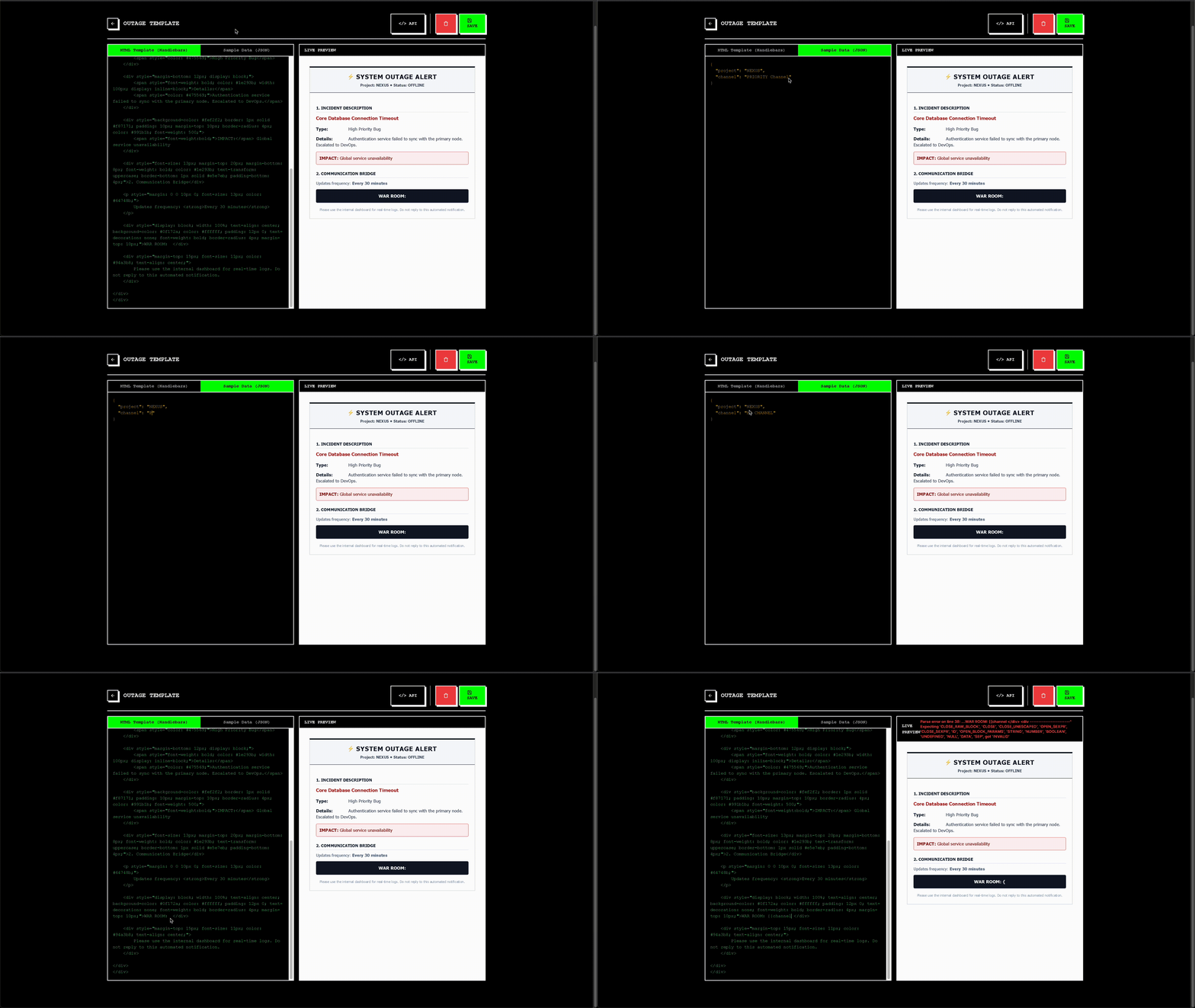
With Hosted Templates, you can store your HTML layouts in our dashboard and simply send the JSON data when generating a PDF. This keeps your codebase clean and allows non-developers to update invoice designs without deploying code.
1. Storage
Save standard, reusable templates (Invoices, Reports, Certificates) in your dashboard.
2. Live Preview
Edit HTML/CSS with a realtime visual preview. Test with sample JSON data instantly.
3. Integration
Get copy-paste ready API snippets for each template directly from the editor.
How it works
We support Handlebars and Jinja2 syntax. Define variables in your HTML using double curly braces.
<!-- HTML Template: 'invoice-v1' -->
<h1>Invoice #{{ invoice_number }}</h1>
<div className="items">
  {{#each items}}
    <p>{{ description }}: {{ price }}</p>
  {{/each}}
</div>{
"data": {
"invoice_number": "IVO-001",
"items": [
{ "description": "API Plan", "price": "$29.00" }
]
},
"wait": true
}
Ready to start? Sign up for an account to access the My Templates dashboard.